Windows · macOS · Linux
Process thousands of images in one pass.
Kiln is a desktop app for converting, resizing, compressing, and renaming images in bulk. Define a pipeline once, point it at a folder, and run it.
Public beta available now for Windows, macOS, and Linux.

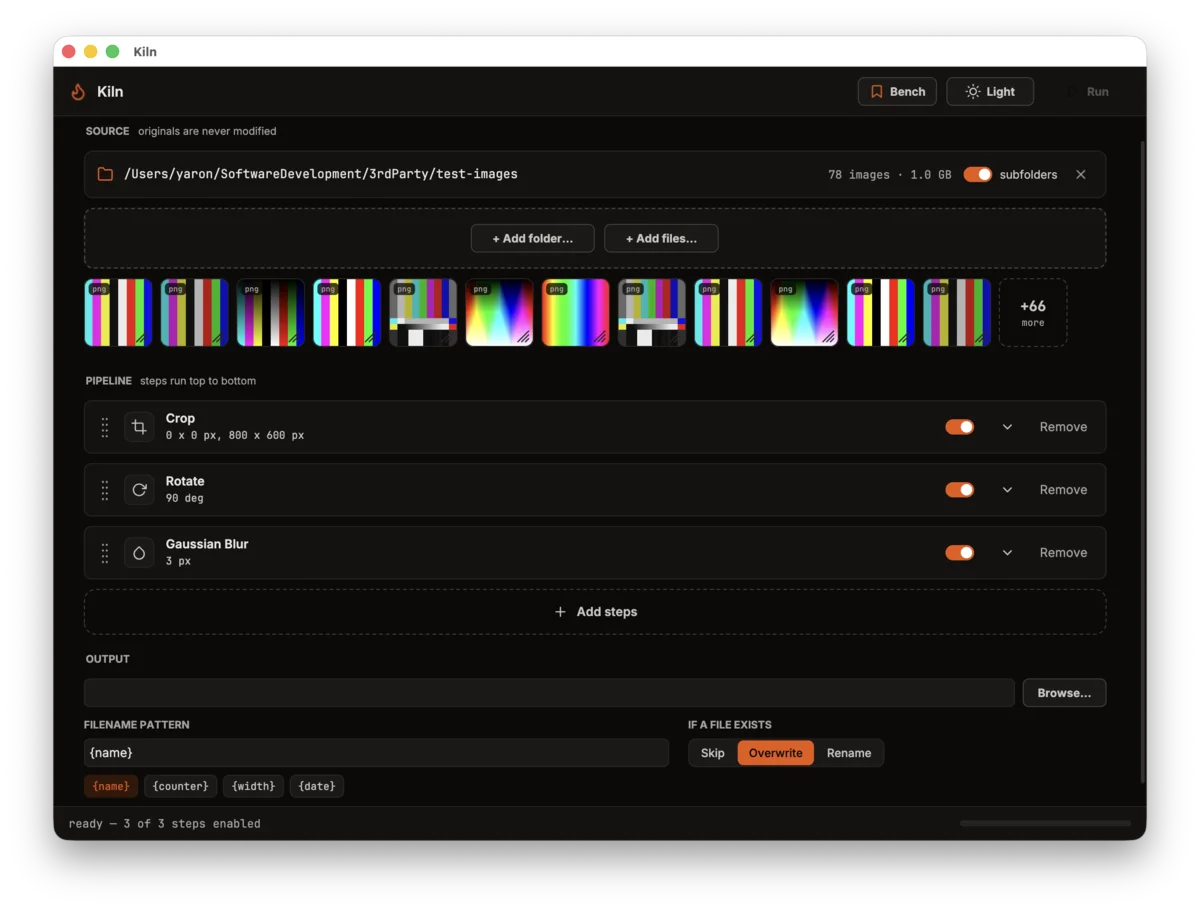
What it does
Kiln handles the repetitive parts of working with large image sets.
Reusable pipelines
Chain resize, convert, compress, watermark, sharpen, blur, rotate, flip, and metadata editing steps in any order. Save a pipeline and rerun it on the next batch — same result every time.
Parallel by default
Batches are processed in parallel across your CPU cores. Ten images or ten thousand — the workflow is the same.
Format support
Reads JPEG, PNG, WebP, AVIF, HEIC, TIFF, BMP, and GIF. Writes JPEG, PNG, WebP, AVIF, and TIFF, with per-format quality control.
Non-destructive
Originals are never modified. Output always goes to a separate directory, and the status bar shows what was processed and skipped when a run finishes.
Filename templates
Build output names from {name}, {counter}, {width}, and {date} tokens. When a file already exists, choose whether Kiln skips, overwrites, or renames.
Local and offline
A native desktop app. All processing happens on your machine — no uploads, no account, no telemetry.
RAW input, watch folders, and pre-run preview are under consideration but not committed — if one of those would decide it for you, say so. It directly affects what gets built.
How it works
- 01
Add images
Point Kiln at a folder — with or without its subfolders — or drop in individual files. The batch and its total size show up before anything runs.
- 02
Build the pipeline
Stack processing steps in the order you want them applied. Drag to reorder, toggle steps on and off, and adjust each step's settings inline.
- 03
Run it
Kiln processes the batch in parallel and writes to your output directory, leaving the originals untouched. The status bar tracks progress and shows what was processed and skipped.
Measured against XnConvert
Neither app has a command line, so one automation script drives both through their UI and times both the same way: wall-clock from the moment the job starts to the last output file written. Kiln finishes ahead of XnConvert on every job below, and the gap grows as the pipeline does more per image.
Median of four runs each; the spread across runs was under 0.15 s in every case. We gave XnConvert its best case — all 8 cores (though it ships defaulting to one) — and confirmed both apps produced the same files at the same dimensions before comparing times.
| Job | Images | Kiln | XnConvert | Kiln faster |
|---|---|---|---|---|
Resize + convert Fit 1920 Lanczos → JPEG q85 | 78 · PNG + TIFF | 4.58s | 4.78s | 1.04× |
Convert only → JPEG q85 | 78 · mixed | 1.77s | 2.60s | 1.47× |
Resize only Fit 1920 Lanczos | 61 · PNG | 9.66s | 13.17s | 1.36× |
Resize only Fit 1920 Lanczos | 17 · TIFF | 0.44s | 1.04s | 2.36× |
Resize + rotate + blur + grayscale Four operations chained | 20 · PNG | 2.40s | 5.13s | 2.14× |
Resize + rotate + blur + grayscale Four operations chained | 21 · JPEG | 1.25s | 3.49s | 2.79× |
Resize + rotate + blur + grayscale Four operations chained | 20 · WebP | 1.99s | 4.00s | 2.01× |
Resize + rotate + blur + grayscale Four operations chained | 17 · TIFF | 0.75s | 1.87s | 2.49× |
MacBook Air (M2, 16 GB), macOS 26.5.2, XnConvert 1.112.0, July 2026. Lanczos resize and JPEG q85 aren't bit-identical between engines, but do comparable work.
Specifications
What the beta does today, and what is planned. Formats and operations are still being added — missing one you need? Tell us.
- Platforms
- Windows 10+, macOS 26+ (Silicon only), Linux (deb, rpm - Wayland only)
- Input formats
- JPEG, PNG, WebP, AVIF, HEIC, TIFF, BMP, GIF
- Output formats
- JPEG, PNG, WebP, AVIF, TIFF
- Operations
- Resize, convert, compress, watermark, sharpen, blur, rotate, flip, rename, metadata (EXIF/IPTC/XMP) editing
- Output naming
- {name}, {counter}, {width}, {date} tokens; skip, overwrite, or rename on collision
- Privacy
- Fully offline; no telemetry, no uploads, no account
Frequently asked questions
When will Kiln be available?
The public beta is available now on the download page for Windows, macOS, and Linux — no signup required.
What will it cost?
A one-time license per major version. No subscription, no account requirement. The beta is free, and pricing will be announced before 1.0.
Do my images leave my machine?
No. Kiln is a native desktop application and all processing happens locally. It makes no network requests during processing and collects no telemetry.
Does it read RAW files?
Not currently, and support isn't committed — Kiln reads standard raster formats (JPEG, PNG, WebP, AVIF, HEIC, TIFF, BMP, GIF). If RAW input matters to your workflow, say so on the feedback page; demand is what will decide it.
Is there a CLI?
A companion CLI that runs the same pipelines from scripts and CI is planned. If that matters for your workflow, say so on the feedback page — it affects prioritization.
I found a bug / I need a specific format.
Use the feedback page to report bugs or request formats and features. Reports go straight into the development backlog.
The public beta is here.
Free builds for Windows, macOS, and Linux are available now on the download page. No signup required.